If you’re new to CNC relief carving, you’ve probably heard the term depth map. Understanding what a depth map is—and how it works—is one of the most important steps toward creating realistic carvings.
Whether you’re making wildlife scenes, portraits, patriotic artwork, or decorative signs, a quality depth map can save hours of modeling while producing impressive results.
What Is a CNC Depth Map?
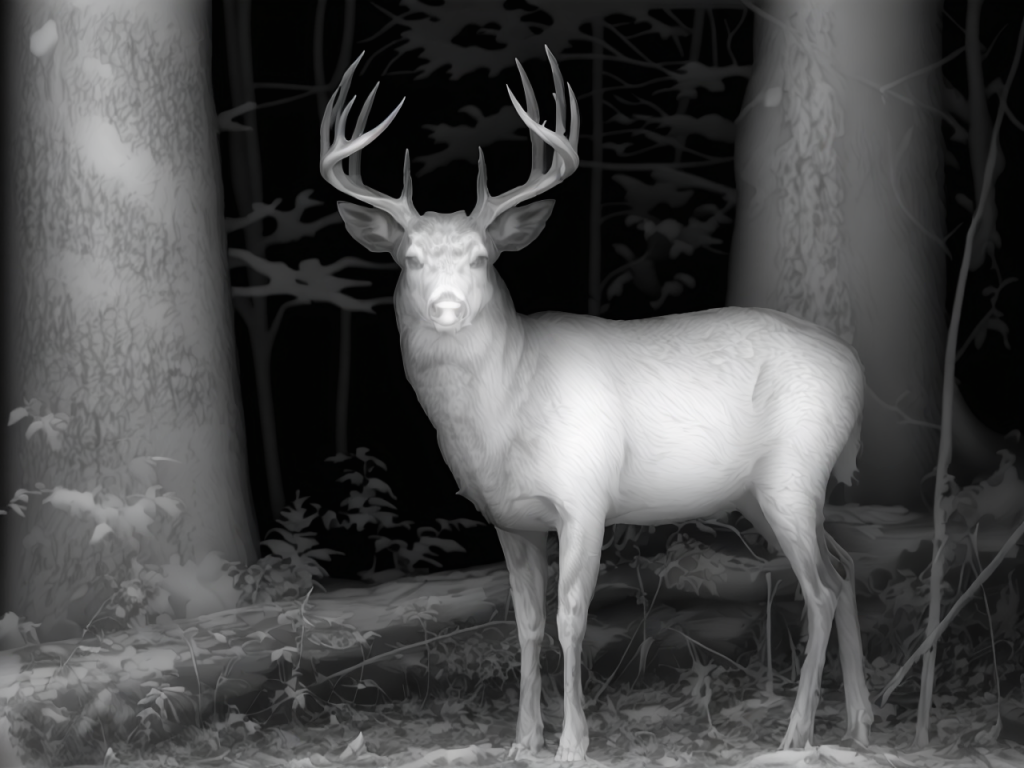
A CNC depth map is a grayscale image where each shade of gray represents a different height.
- White = Highest areas
- Black = Lowest areas
- Gray = Heights between black and white
When imported into compatible CNC software, these shades are converted into a three-dimensional relief that your CNC router can carve.
Think of a depth map as a blueprint that tells your CNC exactly how high or low every point on the finished carving should be.
Why Use a Depth Map?
Without a depth map, creating a detailed relief often requires hours of manual sculpting in 3D software.
A quality depth map can dramatically reduce that work by providing the depth information needed to generate a relief quickly.
Benefits include:
- Faster project setup
- More realistic carvings
- Consistent results
- Less time spent editing models
How Does a Depth Map Become a Relief?
The process is surprisingly simple.
- Start with a quality image.
- Generate or obtain a depth map.
- Import the depth map into your CNC software.
- Adjust the overall depth if needed.
- Create your toolpaths.
- Carve the finished project.
The better the depth map, the better the finished carving.
What Software Can Use Depth Maps?
Many popular CNC programs support importing grayscale images or converting them into reliefs, including:
- Vectric Aspire
- Carveco
- Fusion 360 (with additional workflow)
- MeshCAM
- Other relief-capable CAM software
Each program handles depth maps a little differently, but the basic concept is the same.
What Makes a Good Depth Map?
Not all depth maps are created equal.
A high-quality depth map should have:
- Smooth transitions
- Well-defined subject edges
- Natural depth
- Minimal noise
- Good separation between foreground and background
Poor depth maps often produce flat-looking carvings or unwanted artifacts.
Can AI Create Depth Maps?
Yes.
Modern AI tools can generate impressive depth maps from photographs. However, the quality varies significantly depending on the model used and how well the image is prepared.
In many cases, additional editing is needed to improve shadows, remove background noise, or enhance important details before carving.
Common Beginner Mistakes
Many new users assume that any grayscale image will produce a good relief.
Unfortunately, that’s not the case.
Common mistakes include:
- Using blurry source images
- Choosing low-resolution photos
- Expecting AI-generated maps to be perfect without cleanup
- Carving too deep
- Using the wrong finishing tool
Learning to recognize a quality depth map is one of the fastest ways to improve your carvings.
Why DepthMapPro?
At DepthMapPro, we focus on creating depth maps specifically for CNC relief carving.
Our goal is to provide files that require less cleanup, preserve important details, and help woodworkers spend more time carving and less time fixing models.
Whether you’re just getting started or already creating advanced relief carvings, using a quality depth map gives your project the best possible foundation.
Final Thoughts
Depth maps are the bridge between a flat image and a three-dimensional CNC carving.
Once you understand how they work, you’ll be able to create more detailed, realistic reliefs while reducing the amount of manual modeling required.
If you’re serious about CNC relief carving, learning how to work with quality depth maps is one of the best investments you can make.
Related Articles
- 5 Common CNC Relief Mistakes (and How to Avoid Them)
Explore DepthMapPro
Looking for high-quality depth maps for your next CNC project?
Browse the growing collection of AI-assisted depth maps and Shadow Layer Relief™ designs at DepthMapPro, designed to help you create cleaner, more detailed carvings with less preparation.
Leave a Reply